Opening · 1/89
Web development: past, present, and possible futures
How do we organize, connect, and use knowledge?
Explore the web’s history and possible futures while we build an application together.
Juho Vepsäläinen · 16.9.26
Opening · 2/89
Today’s route
- Past — Finding knowledge; documents, links and native forms
- Present — Browser interaction; AJAX and shared state
- Future — What people might delegate to agents
- References — Sources and further reading
Opening · 3/89
Join the live lecture

Keep this page open for votes and word clouds. No account needed.
Opening · 4/89
Practice vote: which drink would you pick?
Lecture activity · submissions are closed in this reading copy.
- Coffee
- Tea
- Water
Opening · 5/89
Practice word cloud: name a place you would like to visit
Lecture activity · submissions are closed in this reading copy.
Enter one place per line on live.scalableweb.dev.
Use 1–3 words per idea, up to 32 characters. Submit up to five ideas together.
Opening · 6/89
One seminar app, three stages
We’ll build an app to help someone decide whether to attend SDLCAI, a seminar about AI in software development.
- Document: find the seminar essentials and follow source links.
- Interactive app: submit preferences and see shared results.
- Generated view: adapt the information to a chosen priority.
Opening · 7/89
When deciding whether to attend a seminar, what information do you need first?
Lecture activity · submissions are closed in this reading copy.
Word cloud
On live.scalableweb.dev, enter one idea per line.
Use 1–3 words per idea, up to 32 characters. Submit up to five ideas together.
Opening · 8/89
Which visual theme should shape our app?
Lecture activity · submissions are closed in this reading copy.
- Editorial
- Retro web
- Playful
Opening · 9/89
Build · Create the seminar document
Live demonstration · implementation instructions omitted from this reading copy.
Past · 10/89
Past
Finding and connecting knowledge
Past · 11/89
Otlet: organizing knowledge (1895)

The Universal Bibliographic Repertory: a shared catalogue of publications, organized for retrieval.
Past · 12/89
Bush: Memex and associative trails (1945)

Memex was a proposal: preserve an associative trail between records, rather than only filing each record in a category.
Past · 13/89
A research trail is more than a folder
flowchart LR
 Question --> Article
 Article -->|reference| Earlier[Earlier study]
 Earlier -->|association| Example[Example from another field]
Past · 14/89
Nelson: hypertext and Xanadu (1965)

Hypertext supports non-sequential reading; Xanadu also pursued visible connections and reuse tied to origins.
A File Structure for the Complex, the Changing and the Indeterminate (1965)
Past · 15/89
Engelbart: the NLS demonstration (1968)

The demonstration combined linked information and shared work: augment people’s ability to solve problems together.
Past · 16/89
CERN: one filing tree is not enough (1989)
Projects change, people leave, and information is spread across incompatible systems.
A person can belong to several projects; a document can describe several systems. Where should each record go?
Past · 17/89
CERN: finding shared knowledge (1989)
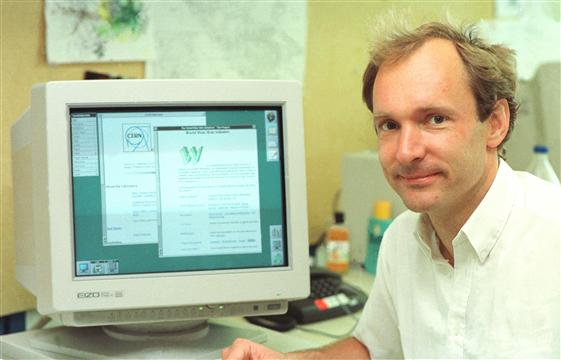
Often, the information has been recorded, it just cannot be found.
Tim Berners-Lee · Information Management: A Proposal
His proposal: follow links between documents, including documents on different servers.
Past · 18/89
WorldWideWeb browser-editor (1990)
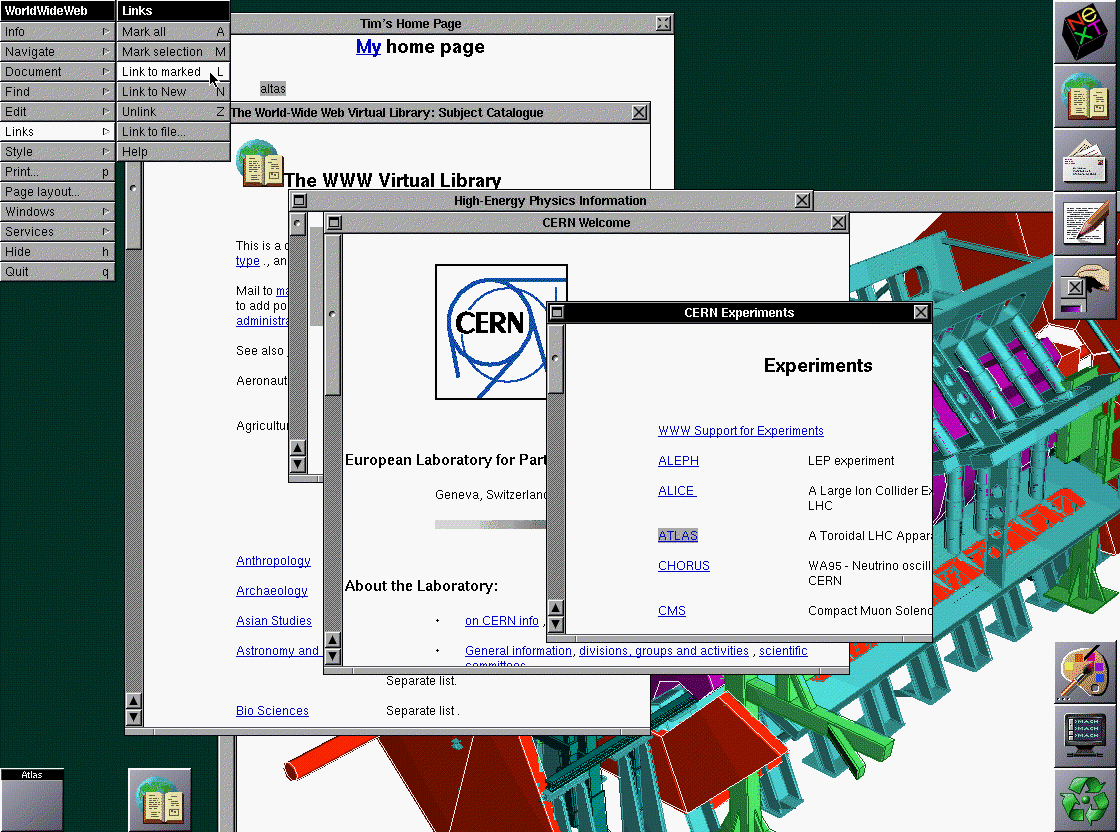
The browser also edited documents and created links: authoring and reading belonged in the same tool.
Past · 19/89
HTML: headings, paragraphs and links
<h1>Seminar</h1>
<p>Topic, date and location.</p>
<a href="https://www.sdlcai.org/">Seminar details</a>
Seminar
Topic, date and location.
Past · 20/89
CSS: presentation rules (1996)
Style the same HTML without changing its meaning.
h1 {
  color: navy;
  font-size: 2em;
}
The selector chooses headings; the declarations change how they look.
Past · 21/89
JavaScript: behavior in the browser (1995)
Respond to an action and update the current page.
const button = document.querySelector("button");
button.addEventListener("click", () => {
  document.querySelector("h1").textContent = "Welcome!";
});
Changing the page does not by itself save anything on the server.
Past · 22/89
GeoCities: personal publishing (1994)

Personal publishing widened who could make a web page, while the hosting platform still controlled its availability.
Past · 23/89
Microsoft FrontPage 1.1 (1996)
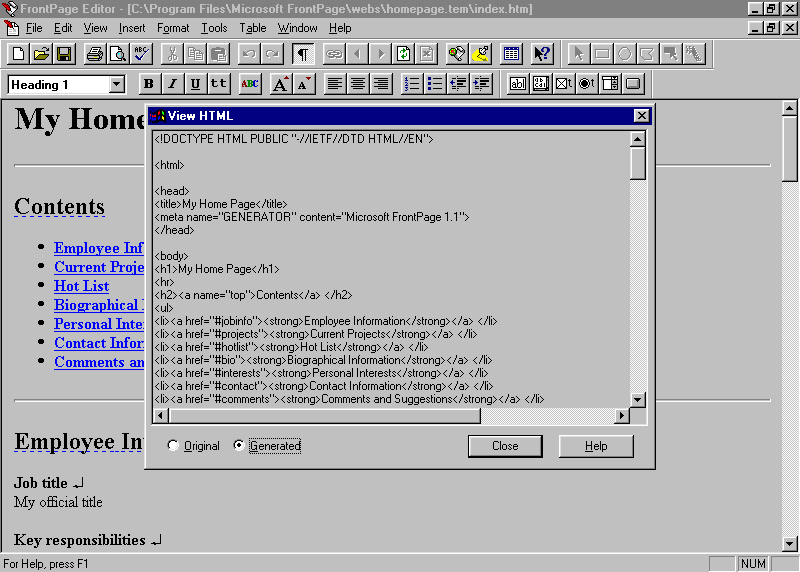
Edit the page visually; inspect the HTML it produces.
Past · 24/89
Macromedia Dreamweaver (1997)

Visual page editing · Dreamweaver 1.2 (1998)
Past · 25/89
Check the build · The document
- Find the seminar essentials and follow a real link.
- Check the headings and reading order.
- Compare the result with the audience’s chosen theme.
Past · 26/89
Did the document answer your questions?
Find the information you asked for in the app we just inspected.
Which need is met? What is still missing or hard to find?
Past · 27/89
What would you like from the seminar?
- Experience: new to the subject, some experience, or regular use
- Interests: choose one or more topics—learning, practical use, or evaluation
- Session format: talk, live demo, or discussion
- Question for the speaker: optional, up to 200 characters
Next we will build this survey. After the build, we’ll submit fresh responses and compare the room’s preferences.
Past · 28/89
HTML forms
<form action="/responses" method="post">
  <label for="experience">Experience</label>
  <select id="experience" name="experience" required>
    <option value="">Choose one</option>
    <option value="new">New to the subject</option>
    <option value="some">Some experience</option>
    <option value="regular">Regular use</option>
  </select>
  <button>Send response</button>
</form>
One field from the seminar-interest form.
Past · 29/89
Build · Add the seminar-interest form
Live demonstration · implementation instructions omitted from this reading copy.
Past · 30/89
Native form submission · 1/4 Submit
sequenceDiagram
%% focus-after: 0,0
 participant B as Browser
 participant S as Server
 participant D as Database
B->>S: POST /responses
Past · 31/89
Native form submission · 2/4 Store
sequenceDiagram
%% focus-after: 1,0
 participant B as Browser
 participant S as Server
 participant D as Database
B->>S: POST /responses
Note over S: Validate input
S->>D: Save response
D-->>S: Response saved
Past · 32/89
Native form submission · 3/4 Redirect
sequenceDiagram
%% focus-after: 3,1
 participant B as Browser
 participant S as Server
 participant D as Database
B->>S: POST /responses
Note over S: Validate input
S->>D: Save response
D-->>S: Response saved
S-->>B: 303 redirect to /results
Past · 33/89
Native form submission · 4/4 Load results
sequenceDiagram
%% focus-after: 0,1
 participant B as Browser
 participant S as Server
 participant D as Database
 Note over B: Follow the redirect
 B->>S: GET /results
 S->>D: Read aggregate
 D-->>S: Current aggregate
 S-->>B: Complete HTML
 Note over B: Replace the document
Past · 34/89
Progressive enhancement (2003)
HTML provides the core task: read and submit.
Past · 35/89
Progressive enhancement (2003)
CSS improves presentation; the same HTML still works.
Past · 36/89
Progressive enhancement (2003)
JavaScript improves interaction; the core task remains available.
Past · 37/89
Submit the survey; inspect confirmation and counts
- Submit experience, interests and format without JavaScript.
- Leave a required field empty; inspect the error and retained values.
- Change an answer and resubmit; check the confirmation and counts.
Past · 38/89
Demo · Remove the outer layers
Compare Full, No JavaScript, and HTML only in this prepared app.
Present · 39/89
Present
Web pages become application-like experiences.
Present · 40/89
Which interaction improvement should we prioritize?
Lecture activity · submissions are closed in this reading copy.
- Clear submission feedback
- Keep my unsent choice
- Keep shared results up to date
Present · 41/89
Build · Make the room interactive
Live demonstration · implementation instructions omitted from this reading copy.
Present · 42/89
AJAX: requests without navigation (1999/2005)
sequenceDiagram
 Browser->>Server: JavaScript sends a request
 Server-->>Browser: Response data
 Note over Browser: Update the current page
1999: XMLHTTP ships with Internet Explorer 5.
2005: Jesse James Garrett names the approach “Ajax”.
Present · 43/89
AJAX: JSON response · 1/4 Request
sequenceDiagram
%% focus-after: 0,0
 participant B as Browser
 participant S as Server
 participant D as Stored responses
Note over B: JavaScript handles submit
B->>S: POST /responses
Present · 44/89
AJAX: JSON response · 2/4 Store
sequenceDiagram
%% focus-after: 1,1
 participant B as Browser
 participant S as Server
 participant D as Stored responses
Note over B: JavaScript handles submit
B->>S: POST /responses
S->>S: Validate input
S->>D: Save response
D-->>S: Updated aggregate
Present · 45/89
AJAX: JSON response · 3/4 Respond
sequenceDiagram
%% focus-after: 4,1
 participant B as Browser
 participant S as Server
 participant D as Stored responses
Note over B: JavaScript handles submit
B->>S: POST /responses
S->>S: Validate input
S->>D: Save response
D-->>S: Updated aggregate
S-->>B: JSON aggregate
Present · 46/89
AJAX: JSON response · 4/4 Update
sequenceDiagram
%% focus-after: 5,1
 participant B as Browser
 participant S as Server
 participant D as Stored responses
Note over B: JavaScript handles submit
B->>S: POST /responses
S->>S: Validate input
S->>D: Save response
D-->>S: Updated aggregate
S-->>B: JSON aggregate
Note over B: JavaScript renders the results region
Present · 47/89
Outlook Web Access (2000)
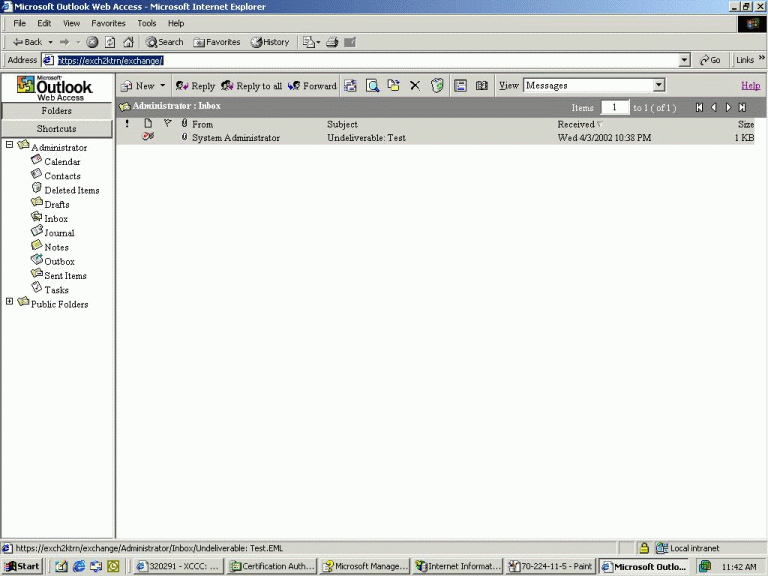
Mail interactions within a browser application, using dynamic HTML and XMLHTTP.
Present · 48/89
Gmail (2004)

A dynamic mail interface helped popularize AJAX.
Present · 49/89
Initial rendering: server or browser
flowchart LR
 subgraph SSR[SSR]
 S[Server renders HTML] --> B[Browser displays HTML]
 end
 subgraph CSR[CSR]
 J[Shell and JavaScript] --> C[Browser fetches data and renders]
 end
Present · 50/89
Serving cached HTML
sequenceDiagram
 participant B as Browser
 participant C as Cache
 participant S as Server
 B->>C: GET /seminar
 alt Fresh cached HTML
 C-->>B: HTML response
 else Missing or expired
 C->>S: GET /seminar
 S-->>C: Rendered HTML
 Note over C: Store if cache policy permits
 C-->>B: HTML response
 end
Present · 51/89
Visible HTML is not the same as initialized JavaScript
Native links and forms can work before JavaScript initializes.
For a JavaScript-dependent control, the HTML may be visible before the control responds.
In our app, identify which controls still work while scripts load.
Present · 52/89
Organizing browser applications (2012–2016)
| Tool | What it helps organize |
|---|---|
| AngularJS 1.0 · 2012 | Templates and two-way data binding |
| React · 2013 | Component-based user interfaces |
| Vue · 2014 | Reactive interfaces and components |
| Angular 2 · 2016 | Components, routing and forms |
The browser manages interface state: unsent input, feedback and displayed results.
Present · 53/89
Change a preference; watch the second view
Change a seminar preference. Watch its aggregate update.
Present · 54/89
Updating a second browser
sequenceDiagram
 participant A as Browser A
 participant S as Server
 participant D as Stored responses
 participant B as Browser B
 A->>S: Submit vote
 S->>D: Save response
 S-->>A: Updated result
 B->>S: Request current aggregate
 S->>D: Read votes
 S-->>B: Current aggregate
 Note over B: Render updated result
Present · 55/89
Check the build · Two views, one result
- Submit in one view; watch the other update.
- Keep an unsent choice while results refresh.
- Submit without leaving the page; watch the confirmation.
Present · 56/89
Did the interaction become easier?
Start with the test chosen by the priority vote. State expected → observed → passed or unresolved.
Then compare the form with the approved needs below. Name one remaining need and the next test.
Present · 57/89
A person can use this. What would another client need to understand it?
Inspect in pairs
Pick one action in our app. Identify its required input and how a client can tell it succeeded.
Report one detail that is explicit—and one the client would have to guess.
Future · 58/89
Future
Agents and interfaces composed for a task
Future · 59/89
Where I think we’re headed
- People describe a task; software helps carry it out.
- Interfaces can be composed around the task.
- Services need to expose their data and available actions clearly.
Future · 60/89
Semantic Web agents (2001)
flowchart LR
 Need[Arrange appointments] --> Agent[Software agent]
 Providers[Providers and availability] --> Agent
 Constraints[Preferences and schedules] --> Agent
 Agent --> Plan[Proposed plan]
Future · 61/89
What should the generated seminar view prioritize?
Lecture activity · submissions are closed in this reading copy.
- Quick overview
- Learning outcomes
- Practical details
Future · 62/89
Before composition: define the boundary
- Inputs: reviewed seminar facts, source links, and one frozen aggregate revision; no questions or identifiers.
- Output: a view assembled from allowed components and source-backed text.
- Actions: existing allowlisted links and controls only; no new booking, purchase, code execution, or authority.
- Validation: check the output structure, URLs and claims before rendering.
- Fallback: retain the fixed view when the model times out or validation fails.
A context receipt records the inputs, destination, revision and result.
Future · 63/89
From selected inputs to a generated view
flowchart LR
 F[Reviewed seminar facts] --> C[Frozen context and receipt]
 R[Predefined-field counts] --> C
 C --> M[Runtime model]
 M --> V[Validate output and allowed actions]
 V -->|Valid| G[Generated view]
 V -->|Invalid or unavailable| B[Fixed fallback]
Both views must answer the same task using the same source revision.
Future · 64/89
Build · Compose a constrained interface
Live demonstration · implementation instructions omitted from this reading copy.
Future · 65/89
Provider-designed and agent-composed interfaces
flowchart LR
 C[Shared capability] --> P[Provider-designed interface]
 C --> A[Agent-composed interface]
 P --> H[Human use]
 A --> H
These can coexist. A generated view alone does not show that an agent can safely execute service actions.
Future · 66/89
Which application type should we examine?
Lecture activity · submissions are closed in this reading copy.
Word cloud
On live.scalableweb.dev, enter one idea per line.
Use 1–3 words per idea, up to 32 characters. Submit up to five ideas together.
Future · 67/89
For this application, which interface approach fits?
Choose one approved application type below and name a specific user task.
A · Stable: the same controls and structure each time.
B · Generated: a view composed for the task.
C · Mixed: stable core actions with generated supporting views.
Report: application + task → A, B or C → reason.
Future · 68/89
Discovering available actions
| Question | In our seminar app |
|---|---|
| What is this? | Seminar information and its source |
| What can I do? | Choose a priority; request a view |
| What input is valid? | The predefined choices |
| What happened? | A result, rejection or unknown outcome |
Future · 69/89
Human accessibility and agent interaction
| Shared design | Human accessibility | Agent use |
|---|---|---|
| Named controls | Identify purpose | Identify action |
| Explicit inputs | Understand choices | Construct valid input |
| Exposed state | Perceive feedback | Check the outcome |
| Stable structure | Navigate consistently | Locate relevant controls |
Future · 70/89
Accessible to people does not mean authorized for agents
A clear action can still require permission.
A machine-readable interface can still exclude people.
Future · 71/89
Describe an action once
For submit seminar interests, describe:
- Inputs: allowed experience, topics and format
- Preconditions: valid fields and an authorized submission
- Outcome: stored response and explicit confirmation
- Failure: preserved input and an honest unknown state
Shared semantics may help different clients. They do not by themselves guarantee accessibility or reliable agent action.
Future · 72/89
Pick one generated claim; find its source
Check the evidence
Pick one claim in the generated output. Find the input that supports it in the context receipt.
Report the claim and its evidence—or say what evidence is missing.
Future · 73/89
Check the build · The generated interface
- Compare the interface with the selected priority.
- Inspect the inputs and locked result it used.
- Show the fallback when generation cannot be used.
Closing · 74/89
Recap · What changes, what remains
- Past: structure information and connect it through links.
- Present: improve interaction while preserving a working foundation.
- Future: give agents explicit data, permitted actions and verifiable results.
Across all three: start with people’s needs, then test whether the implementation meets them.
Closing · 75/89
What we built and tested
| Stage | What we added | What we checked |
|---|---|---|
| Past | Seminar information and a native form | Reading, links and submission without JavaScript |
| Present | Browser interaction and shared results | In-place updates, unsent choices and shared results |
| Future | A generated seminar view | Source inputs, the chosen priority and a fallback |
Closing · 76/89
Where could we take this next?
- Improve the existing app: test with seminar visitors and fix where they get stuck.
- Support another client: expose actions, inputs and results so it can use the same service.
- Explore generated views: compare a generated view with a fixed page on the same task.
Closing · 77/89
What our audience evidence suggests next
Return to the needs we collected at the start: what did our app address, and what remains?
Closing · 78/89
Join us at SDLCAI

Explore AI across the software lifecycle with researchers and practitioners.
13 October 2026 · Marsio, Aalto University, Espoo
Free student tickets (limited): scan the QR or visit bit.ly/4wRkjCa
Closing · 79/89
Questions?
Keep the slides and explore the references:
References · 80/89
References
Sources and further reading
References · 81/89
References · 1–5
- [1] Mundaneum (n.d.). History
- [2] Vannevar Bush (1945). As We May Think
- [3] Ted Nelson (1965). A File Structure for the Complex, the Changing and the Indeterminate. ACM national conference. See also Xanalogical Structure: Now More Than Ever (1999).
- [4] Douglas Engelbart (1962). Augmenting Human Intellect: A Conceptual Framework
- [5] Tim Berners-Lee (1989/1990). Information Management: A Proposal
References · 82/89
References · 6–10
- [6] fdecomite (2011). Drawers: Mundaneum, Mons. Photograph, 23 February 2011. CC BY 2.0; unmodified.
- [7] Computer History Museum. Memex conceptual sketch, c. 1945; object 500004817.
- [8] Ted Nelson. Xanalogical Structure, 2000 version, Fig. 1 (1965 diagram).
- [9] Doug Engelbart Institute. History in Pictures, §4b. Frame from the NLS demonstration, 9 December 1968.
- [10] Tim Berners-Lee and Robert Cailliau (1990). WorldWideWeb: Proposal for a HyperText Project
References · 83/89
References · 11–15
- [11] CERN. The birth of the Web. Tim Berners-Lee photograph, 1994; CERN PhotoLab, record 39437.
- [12] Tim Berners-Lee. The WorldWideWeb browser. Browser-editor written in 1990; reproduced screenshot from 1993.
- [13] W3C (2004). Architecture of the World Wide Web, Volume One
- [14] WHATWG. HTML text-level semantics, living standard.
- [15] Håkon Wium Lie and Bert Bos (1996). Cascading Style Sheets, level 1. W3C Recommendation, 17 December 1996. See also W3C’s history of CSS for the 1994 proposal.
References · 84/89
References · 16–20
- [16] Allen Wirfs-Brock and Brendan Eich (2020). JavaScript: The First 20 Years. History by key participants; open author copy.
- [17] Olia Lialina and Dragan Espenschied. GeoCities: CollegePark/Lounge/9002. Archive capture: 28 April 2009.
- [18] Microsoft (1996). FrontPage 1.1 release and adoption.
- [19] Web Design Museum. Microsoft FrontPage 1.1 in 1996. Screenshot: View HTML. Software interface © Microsoft.
- [20] Macromedia (1997). Macromedia Ships Dreamweaver. Launch announcement reproduced by MacTech.
References · 85/89
References · 21–25
- [21] Web Design Museum. Macromedia Dreamweaver 1.2 in 1998. Screenshot: Working with Document. Software interface © Macromedia.
- [22] WHATWG (living standard). HTML Living Standard — Forms
- [23] Juho Vepsäläinen. Web architecture lens. Teaching model: initial delivery and later interaction are separate decisions.
- [24] Steven Champeon and Nick Finck (2003). Inclusive Web Design for the Future. SXSW presentation; archived original.
- [25] Jesse James Garrett (2005). Ajax: A New Approach to Web Applications
References · 86/89
References · 26–30
- [26] Alex Hopmann. The Story of XMLHTTP. Firsthand account of Outlook Web Access and XMLHTTP.
- [27] Microsoft (1999). Internet Explorer 5 launch, 18 March 1999. XMLHTTP’s inclusion is described in Hopmann’s firsthand account [26].
- [28] ServerWatch (2002). Exchange 2000 OWA tutorial, Figure 5. Contemporary screenshot; interface © Microsoft.
- [29] Paul Buchheit (2005). Guess what just turned 34?. Gmail’s launch and dynamic interface.
- [30] Google (2019). Hitting send on the next 15 years of Gmail. Original 2004 inbox screenshot.
References · 87/89
References · 31–34
- [31] Juho Vepsäläinen. Client activation lens. Teaching comparison of hydration, islands and resumability.
- [32] React. React Versions. Open-source release: 29 May 2013.
- [33] Evan You (2014). First Week of Launching Vue.js.
- [34] Google Open Source (2016). Angular, version 2.
References · 88/89
References · 35–38
- [35] Miško Hevery (2012). Better Web Templating with AngularJS 1.0. Angular. What is Angular?; AngularJS. Developer Guide.
- [36] Petros, Gross, Shaffer and Revelle (2025). The Missing Mechanic: Behavioral Affordances as the Limiting Factor in Generalizing HTML Controls
- [37] Lecture hypotheses and ways to test them (2026). Student-facing summary of the proposals used here; hypotheses, not empirical results. Background: Hypermedia as a Substrate for the Agentic Web: From Documents to Affordances, unpublished manuscript supplied by the lecturer.
- [38] Tim Berners-Lee, James Hendler and Ora Lassila (2001). The Semantic Web. Scientific American 284(5), 34–43.
References · 89/89
References · 39–42
- [39] W3C WAI. Labeling Controls. Human accessibility guidance.
- [40] W3C WAI. User Notification. Human accessibility guidance.
- [41] W3C WAI (living guidance). WCAG overview
- [42] Aaron Gustafson (2008). Understanding Progressive Enhancement